
Hotkeys Page
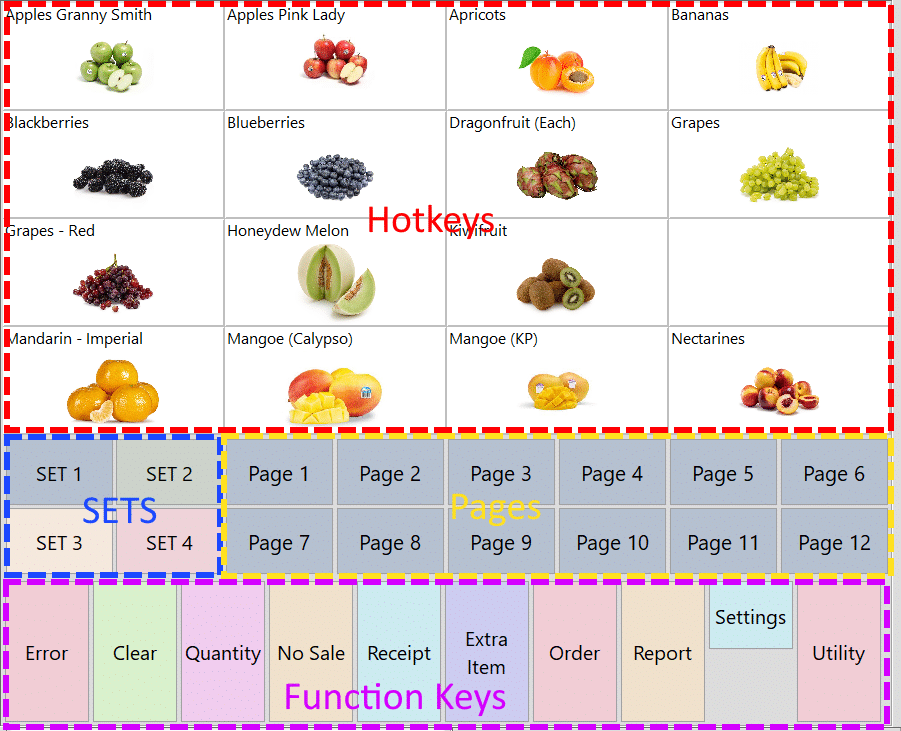
The Hotkeys Page is the main screen that opens when you start NeoPOS. It’s touchscreen friendly and easy to learn. Items can be added to a sale by tapping a Hotkey, scanning a barcode, entering a PLU or searching by name, and running totals are shown below the Transaction Grid.
- Touchscreen friendly and easy to learn
- Add items by Hotkey, barcode scan, PLU entry or name search
- Running totals shown below the Transaction Grid
- Quantity, error correction, void, refund, returns and No Sale
- Percentage and dollar discounts, premiums and price override
- Hold a sale and recall it later, even from another terminal
- Preliminary bills, receipt reprints and email receipts
- Item modifiers (e.g. “Coffee: No Milk”) and size, colour and style options